

User levels
We have introduced a user permissions system in PatientNotes.app to provide better control over roles and access within your organization. This guide outlines the different user roles available and their specific permissions.
User Roles and Permissions
1. Owner
- Access Privileges: Owners have full administrative rights, including complete control over all aspects of the organization, settings, and integrations.
- Billing Access: Enabled to view and manage all billing-related features.
- User Role Management: Can assign and manage other user roles.
- Session and Documentation: Full functionality for session management and letter writing for their own clients.
2. Practice Manager
- Control Over Organization: Full control over organization settings and integrations.
- Billing Access: No access to billing features.
- User Management: Can add and manage practitioners and other users.
- Session and Documentation: Full functionality for session management and letter writing for their own clients.
3. Practitioner
- Access Privileges: Comprehensive access to session functionalities, including the creation and management of clinical notes and patient records.
- Restrictions: No access to organizational settings or billing information.
- Capabilities: Full functionality to write session notes and letters for their own clients, ensuring detailed documentation and communication.
4. Assistant
- Role Definition: Supports practice assistants and administrative staff in composing letters and reports.
- Capabilities: Can generate letters and reports based on the finalized notes of clinicians. Although assistants do not have the ability to edit clinical notes, they are equipped to create administrative documents under the direction of clinicians, ensuring seamless backend support.
User Role Management Interface
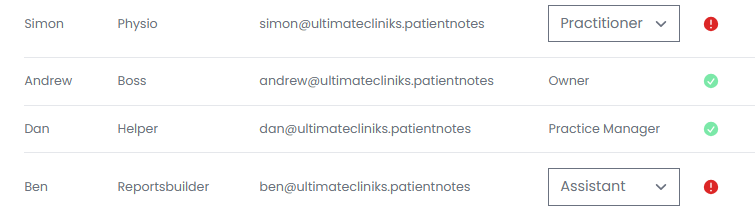
Assistant Feature
Centralizing administrative tasks and assisting clinicians through the assistant feature significantly enhances clinical operations by streamlining efficiency and accuracy.
The assistant role includes a modified login that allows access to team members' completed clinical session notes, enabling them to generate letters and reports.
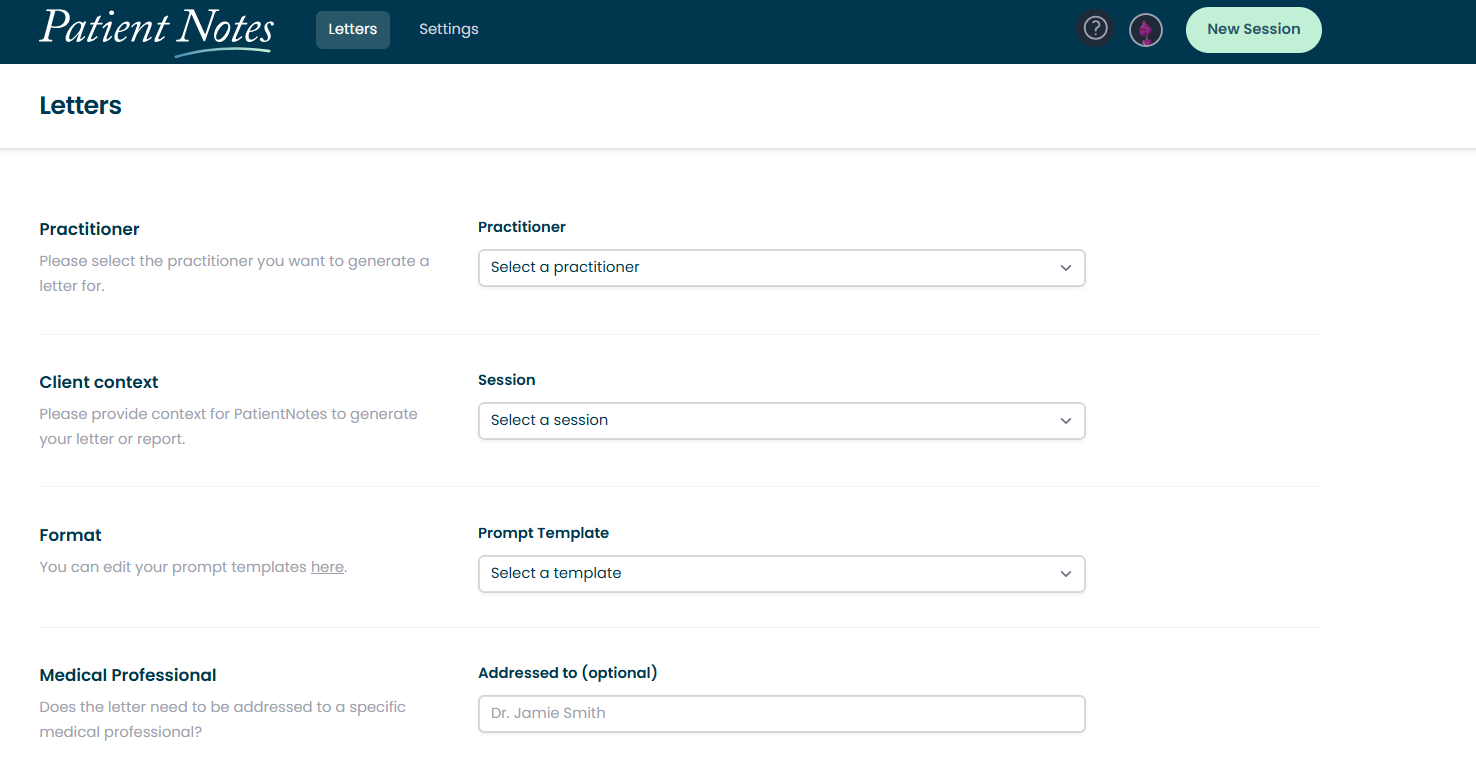
By delegating these tasks, clinicians can focus more intently on patient care, reducing their administrative burden.
This feature ensures that all communications are consistent with clinician oversight and are produced without the need for direct editing by the clinicians themselves. This feature not only accelerates the documentation process but also minimizes errors, maintaining high standards in patient records and overall organizational effectiveness.
For any questions or assistance with user roles, please contact our support team.
New to PatientNotes?
Learn more about how it works or start your free trial.
Frequently asked questions
How does PatientNotes work?
Individual signs up, patient consents, session is recorded, transcribed, AI Model used to generate a draft of your clinical notes, then context gained to create a Patient Summary and any needed letters to medical professionals.
I've been told I can't use ChatGPT with patient information, is it ok to use this?
ChatGPT isn't safe to use with patient information. Data entered into ChatGPT is retained for wider language learning models and often patient information is being entered into ChatGPT without consent. PatientNotes is different. Explicit consent from the patient is required for each session. Transcripts are heavily protected with layers of encryption and strict policies, stored in Sydney in Google's HIPAA compliant data center, and automatically deleted after 30 days.
Is a special microphone required?
Most practitioners start using their default laptop microphone, however for the best results we recommend having a dedicated USB microphone on your desk. Omnidirectional USB microphones work great. Read all about our microphone recommendations on our microphone support page.
Can I use PatientNotes on my mobile phone?
Yes. Navigate to patientnotes.app on your web browser, login, and away you go. Recording works great on mobile devices and on most devices will continue even when the screen locks.
Where are PatientNotes servers located?
PatientNotes runs on servers located in Sydney, Australia. We have plans to have dedicated servers in each country with data stored locally for each user where possible eg. If a user sets their country to United States, their data will reside in the United States.
Does PatientNotes use encryption?
Absolutely. Security and Privacy is critical to protecting personal information. We encrypt all information in transit and at rest. Read more on our Security page.
Is the use of AI in healthcare safe and reliable?
We think of AI as an assistant to the medical practitioner rather than replacing the practitioner in any way. The role of our AI systems are to help produce a draft for the practitioner. Beyond that, it’s up to the practitioner to make the required changes to ensure that the notes are accurate before adding them to a patient record. More broadly, we believe AI has an incredible ability to analyse large amount of data and assist humans, but anything it produces must be validated by a qualified medical professional.
Can AI replace human doctors or healthcare providers?
No. Machines can’t replace doctors or healthcare professionals.
Does the system generate a diagnosis?
The system is fine tuned to not provide a diagnosis and focus just on the facts that were inputted by the healthcare provider during the consultation.
Does PatientNotes comply with all Australia privacy and data retention acts and legislation?
Yes. In Australia we comply with the Privacy Act 1988, Health Records Act 2001 (Victoria) and other national legislation with regards to the storage of personal information. Privacy and Security is critical to our business and we take both incredibly seriously. An important design consideration that we have built into the system is to remove data that isn’t needed anymore, which is why all patient information is automatically deleted after 30 days.
Is PatientNotes HIPAA Compliant?
PatientNotes is fully HIPAA compliant. A Business Associate Agreement (BAA) is available to all US customers. To request a BAA, please contact compliance@patientnotes.app
Do I really need to proofread the drafts PatientNotes produces?
Proofreading clinical notes and letters is of utmost importance to ensure their accuracy and reliability as a representation of the supplied information. Mistakes or inaccuracies in medical documentation can have serious consequences, leading to misdiagnosis, incorrect treatment plans, and compromised patient care. Thorough proofreading allows healthcare professionals to review and correct any errors, inconsistencies, or missing information, ensuring that the final notes and letters are a true reflection of the patient's condition and the provided information. This attention to detail enhances communication, promotes patient safety, and facilitates effective collaboration among healthcare teams.