

Windows audio cable- compatible systems
VoiceMeeter Audio Routing Setup for Windows, PatientNotes & Telehealth
This guide helps you seamlessly manage audio routing for PatientNotes and platforms like Zoom, Google Meet, and Coviu using VoiceMeeter, ensuring clear and reliable recording and communication.
🔧 Step 1: Install VoiceMeeter
Download VoiceMeeter Standard from the official website:
👉 https://vb-audio.com/Voicemeeter/
- Run the installer, then restart your computer.
- On first launch, allow microphone permissions when prompted.
- Note: VoiceMeeter is a third-party application. While we will assist where possible, it is not developed or maintained by PatientNotes. When you download it, you will have a 30-day trial
period. After this, a small contribution (approximately $10 ) may be required. - According to the developers:
“Voicemeeter Banana application is free to use with all functions available. You pay what you want, when you want, if you find it useful. After 30 days, the software will invite you to buy a license or continue to evaluate.”
🔧 Step 2: Configure VoiceMeeter
A. Set Your Microphone
- In Stereo Input 1, select your physical mic (e.g., USB mic, AirPod mic).
- Uncheck the A button to prevent echo (you won't hear your own voice).
- Ensure only B1 is checked to send audio to virtual channels.
B. Set Your Output Device (this is the device you want to hear on i.e speakers or headphones)
- In the Hardware Out (A1) dropdown (top-right), choose your headphones or speakers.
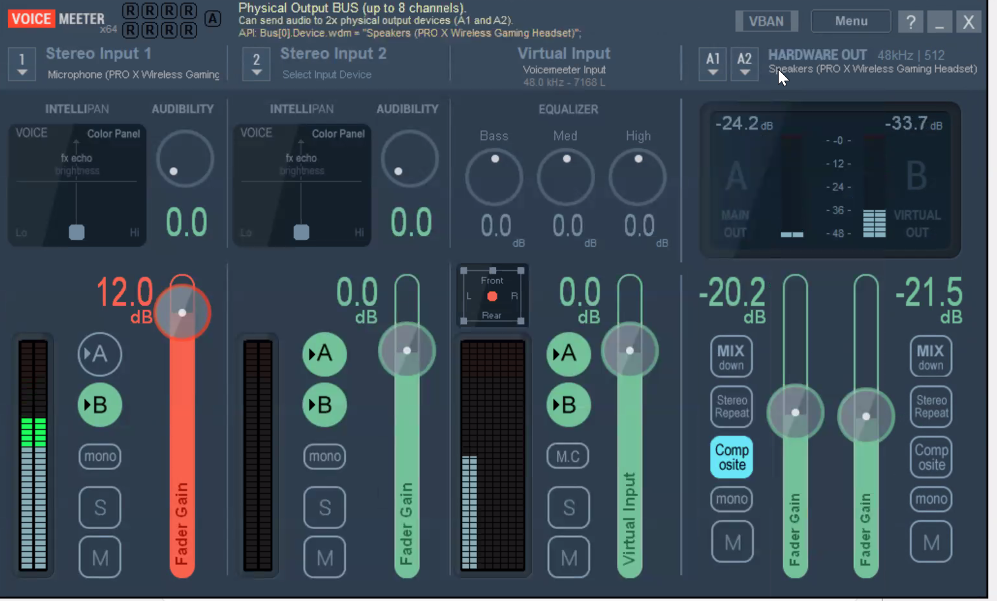
C. Understand Routing VoiceMeeter acts like a digital mixing desk to allow for audio from both your microphone and your telehealth system to be combined
[Your Real Mic] ───▶ [VoiceMeeter Input] ───▶ [Apps like Zoom, Meet, PatientNotes]
                              ▲
[Windows System Audio] ─────────────────────┘
- VoiceMeeter Input = Windows and Zoom system audio OUT.
- VoiceMeeter Output (B1) = This is the combined audio that needs ot go into PatientNotes so that both you and your client will come into PatientNotes.
- VoiceMeeter AUX Input/Output (B2) = Recommended default for Speaker Out of your telehealth platforms, this will ensure better outoput.
🪟 Step 3: Windows Sound Settings
- Right-click the 🔊 speaker icon → "Sound settings" or "Sounds"
Playback Tab:
- Set VoiceMeeter AUX Input (VB-Audio VoiceMeeter AUX VAIO) as the default device for best compatibility.
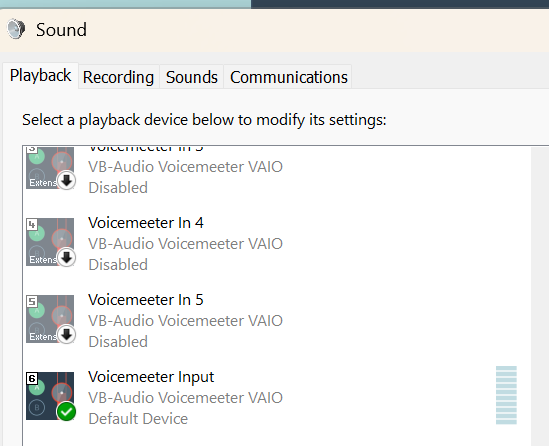
Recording Tab:
- Set your physical microphone as the default.
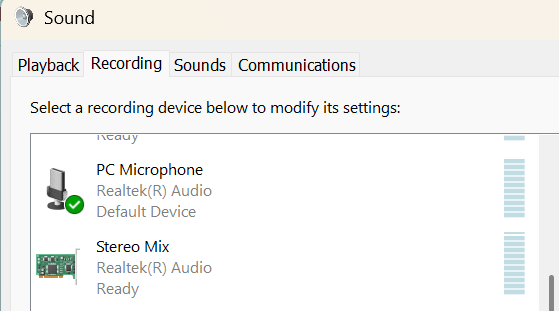
(Optional) Disable unused devices: Right-click VoiceMeeter VAIO / VAIO3 → Disable (both tabs).
Step 4: Set Up in PatientNotes
- Open PatientNotes.
- Go to Microphone settings (gear icon or dropdown).
- Set the input to VoiceMeeter Output (B1).
- Confirm the recording bubble is active.
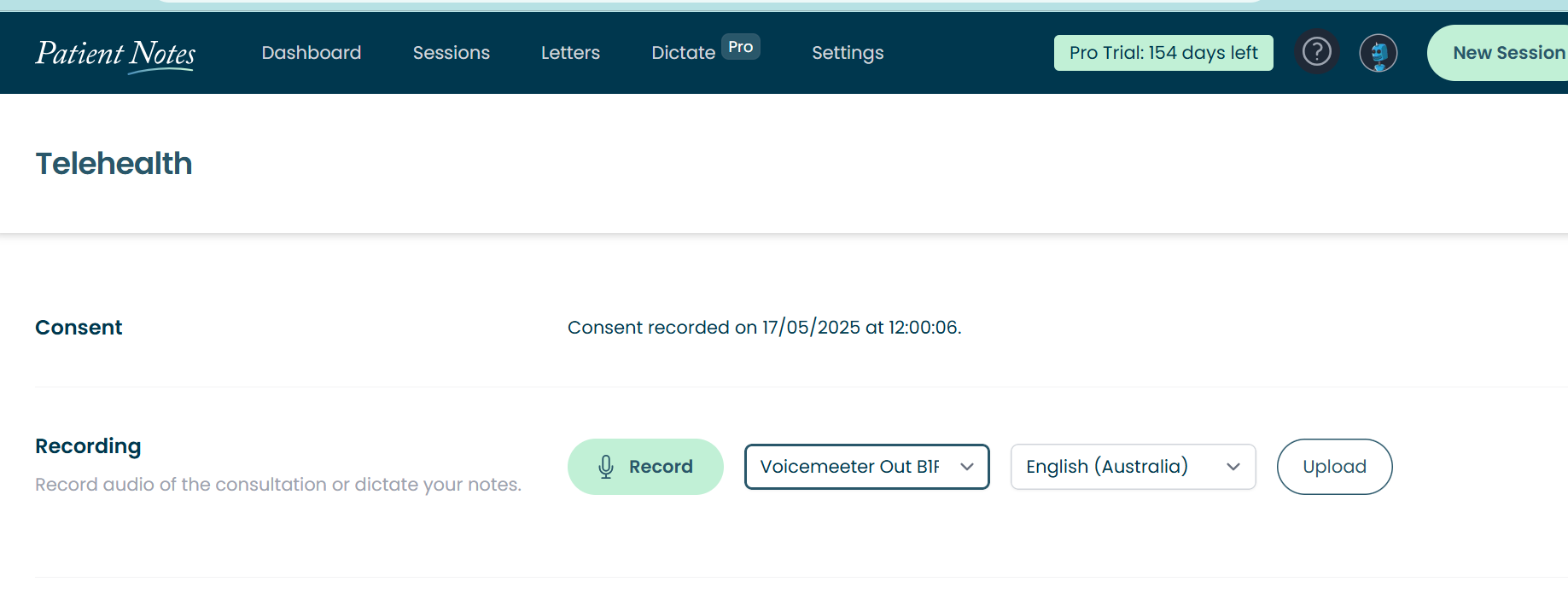
Test It:
- Do a test call with someone.
- As they talk, you should see the audio bubble in PatientNotes appear and move.
- If it doesn’t move, double-check your microphone settings in both PatientNotes and VoiceMeeter.
🎥 Step 5: Configure in Zoom, Google Meet, Coviu
PlatformMicrophone SettingSpeaker SettingZoomVoiceMeeter Output (B1)VoiceMeeter AUX Input (VB-Audio AUX VAIO)Google MeetVoiceMeeter Output (B1)Default / VoiceMeeter AUX InputCoviuVoiceMeeter Output (B1)VoiceMeeter AUX Input
Browser Conflict Tip (Cliniko + PatientNotes)
If you're running both your telehealth session in Cliniko or another program that does not allow you to adjust your sound out and PatientNotes in the same browser, audio input from the other person may not be recorded, even if you can hear them clearly. This occurs because some browsers restrict microphone access to a single tab or app at a time, which can block PatientNotes from receiving the audio feed.
✅ Recommended Setup:
- Use Firefox or Edge for your Cliniko telehealth video call
- Use Chrome for running PatientNotes
This ensures audio is routed correctly to both systems, avoiding situations where VoiceMeeter appears to be working but the recording does not capture your client’s voice.
Help & Troubleshooting
1. Switching from Telehealth (VoiceMeeter) to In-Person Sessions
If you need to stop using VoiceMeeter and use your local mic (e.g. in the room):
- Close VoiceMeeter:
- Click the ❌ top-right of the VoiceMeeter window.
- Click "Yes" to confirm exit.
- Change Mic in PatientNotes:
- Choose Built-in Mic, USB Mic, or AirPods from the dropdown.
- Check waveform appears.
- Reset Windows Sound Settings:
- Right-click 🔊 speaker icon → "Sound settings"
- Input = Local mic
- Output = Headphones or speakers
- Restart apps if needed (Zoom, Meet, PatientNotes).
2. Switching Between Zoom, Google Meet, etc.
To prevent audio issues when changing apps:
- Check that:
- Mic = VoiceMeeter Output (B1)
- Speakers = VoiceMeeter AUX Input
- If no sound:
- Restart app
- Ensure VoiceMeeter is running
- Recheck routing (B1 ticked)
3. Mic or Speakers Not Working?
Try these steps:
- Open VoiceMeeter
- Confirm routing:
- Mic in Input 1, only B1 ticked
- A1 = headphones/speakers
- Windows:
- Playback = VoiceMeeter AUX Input
- Recording = Physical mic
- Restart app (Zoom, PatientNotes, etc.)
- Use a test call or sound recorder to confirm functionality
4. Too many devices showing in drop down- Optional Advanced Cleanup
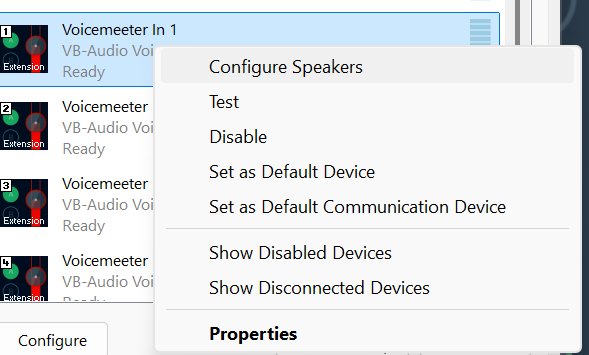
- Open Control Panel > Sound > Playback/Recording or click the windows sound setting button from inside of Voicemeteer- this is accessed from the Hardware output button, choose dropdown A1 and look for the "Open Windows sound" button as shown below.

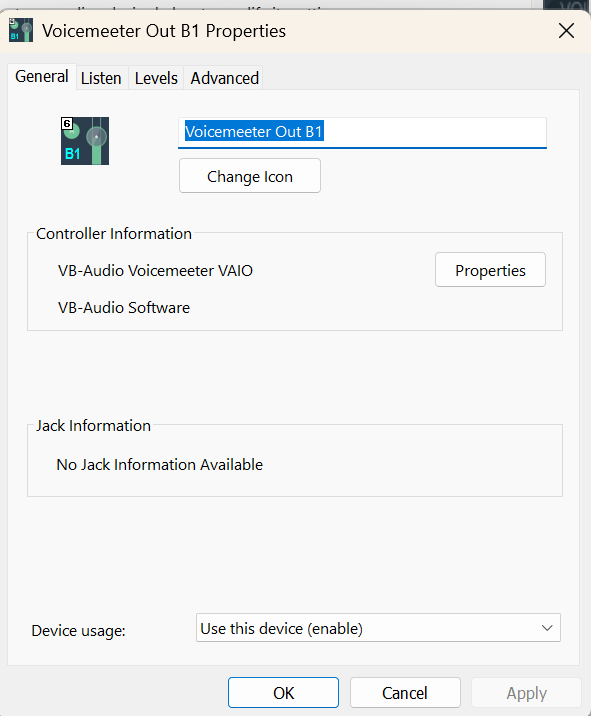
Here you will see all the available inputs- note, do not disable your physical microphones. To disable or hide the right click when on a device- Right-click unused devices → Disable
- You also have the option to rename devices for clarity (e.g., "Telehealth Mic"). Noet for this to come into effect you may need to restart your PC and web browsers
Installation Guide
New to PatientNotes?
Learn more about how it works or start your free trial.
Frequently asked questions
How does PatientNotes work?
Individual signs up, patient consents, session is recorded, transcribed, AI Model used to generate a draft of your clinical notes, then context gained to create a Patient Summary and any needed letters to medical professionals.
I've been told I can't use ChatGPT with patient information, is it ok to use this?
ChatGPT isn't safe to use with patient information. Data entered into ChatGPT is retained for wider language learning models and often patient information is being entered into ChatGPT without consent. PatientNotes is different. Explicit consent from the patient is required for each session. Transcripts are heavily protected with layers of encryption and strict policies, stored in Sydney in Google's HIPAA compliant data center, and automatically deleted after 30 days.
Is a special microphone required?
Most practitioners start using their default laptop microphone, however for the best results we recommend having a dedicated USB microphone on your desk. Omnidirectional USB microphones work great. Read all about our microphone recommendations on our microphone support page.
Can I use PatientNotes on my mobile phone?
Yes. Navigate to patientnotes.app on your web browser, login, and away you go. Recording works great on mobile devices and on most devices will continue even when the screen locks.
Where are PatientNotes servers located?
PatientNotes runs on servers located in Sydney, Australia. We have plans to have dedicated servers in each country with data stored locally for each user where possible eg. If a user sets their country to United States, their data will reside in the United States.
Does PatientNotes use encryption?
Absolutely. Security and Privacy is critical to protecting personal information. We encrypt all information in transit and at rest. Read more on our Security page.
Is the use of AI in healthcare safe and reliable?
We think of AI as an assistant to the medical practitioner rather than replacing the practitioner in any way. The role of our AI systems are to help produce a draft for the practitioner. Beyond that, it’s up to the practitioner to make the required changes to ensure that the notes are accurate before adding them to a patient record. More broadly, we believe AI has an incredible ability to analyse large amount of data and assist humans, but anything it produces must be validated by a qualified medical professional.
Can AI replace human doctors or healthcare providers?
No. Machines can’t replace doctors or healthcare professionals.
Does the system generate a diagnosis?
The system is fine tuned to not provide a diagnosis and focus just on the facts that were inputted by the healthcare provider during the consultation.
Does PatientNotes comply with all Australia privacy and data retention acts and legislation?
Yes. In Australia we comply with the Privacy Act 1988, Health Records Act 2001 (Victoria) and other national legislation with regards to the storage of personal information. Privacy and Security is critical to our business and we take both incredibly seriously. An important design consideration that we have built into the system is to remove data that isn’t needed anymore, which is why all patient information is automatically deleted after 30 days.
Is PatientNotes HIPAA Compliant?
PatientNotes is fully HIPAA compliant. A Business Associate Agreement (BAA) is available to all US customers. To request a BAA, please contact compliance@patientnotes.app
Do I really need to proofread the drafts PatientNotes produces?
Proofreading clinical notes and letters is of utmost importance to ensure their accuracy and reliability as a representation of the supplied information. Mistakes or inaccuracies in medical documentation can have serious consequences, leading to misdiagnosis, incorrect treatment plans, and compromised patient care. Thorough proofreading allows healthcare professionals to review and correct any errors, inconsistencies, or missing information, ensuring that the final notes and letters are a true reflection of the patient's condition and the provided information. This attention to detail enhances communication, promotes patient safety, and facilitates effective collaboration among healthcare teams.